In this guest blog post, Matt Hagedorn explores how AI is revolutionizing education, particularly for health and PE teachers. Drawing from his own tech-savvy background, he highlights six must-try AI tools that save time, enhance student engagement, and streamline lesson planning.
I still remember the first time I held an iPhone. It wasn’t just another cool gadget—something about it felt different. As I played around with it, I knew everything would change. And it did. It transformed how we communicate, work, and navigate daily life. Entire industries adapted, education evolved, and the way we connect as humans has been transformed in a way that will never be the same.
AI feels bigger.

Right now, we are at the dawn of the most significant technological shift we’ve ever seen. AI isn’t just some tool—it’s changing the way we think, learn, and teach. In the same way that those who embraced smartphones early had a massive advantage, the same is true with AI. If you’re not exploring it now, you’re already behind. But don’t worry—you’re about to catch up.
Before I was teaching health education, I was rocking the black and white Best Buy Geek Squad uniform, fixing up those massive PC towers people lugged into the store. That experience instilled in me a passion for staying ahead of the curve with technology. As an educator, I’ve carried that curiosity into the classroom, looking for ways tech can enhance student learning, engagement, and critical thinking. And AI? It’s the tool that’s revolutionizing how we teach.
AI Powerhouses for Educators: Must-Try Tools
I’ve tested tons of AI tools, and these six are absolute game-changers for Health and PE teachers. Let’s break them down:
1. Gamma.app – Instant Presentations for Busy Educators

- What it does: Converts text into polished, visually engaging presentations with a single click.
- How I use it: When I have a bunch of information but no time to create slides, I throw it into Gamma, and within seconds, I get a presentation. Sure, I tweak the text and add images, but the bulk of the work is already done.
- Why it matters: Saves hours of time, making lesson planning more efficient.
- Bonus: I love how it gives you this info so you can format it correctly when you export it!
- Best for: Health and educators needing quick, high-quality slides or improving the look of your old slides.
- Try it here: Gamma.app

2. Brisk – AI That Does the Heavy Lifting for You
- What it does: Acts as a teaching assistant, helping with lesson plans, feedback, and even student engagement.
- How I use it: If I have a ton of text for a slide deck but haven’t formatted it yet, I throw it into Brisk’s ‘Add Slides’ feature, and it creates a complete presentation. (Yes, I still adjust things, but it gives me an incredible starting point.)
- Student Feedback & Grading: Brisk makes grading faster and more personalized by analyzing student responses, offering instant feedback, and even helping craft detailed rubric-based comments. It can also flag areas where students need extra support, helping teachers provide more targeted guidance.
- Other cool features: AI-generated assignments, rubrics, and grading support.
- Best for: Creating interactive lesson content quickly without sacrificing quality, and providing efficient, meaningful student feedback.
- Try it here: Brisk
3. Magic School – The Swiss Army Knife for Educators

- What it does: Offers tons of AI-powered tools designed specifically for teachers.
- Key feature: Text Analysis Tool – Upload any article, lesson, or resource, and Magic School will break it down for readability, key themes, and even create comprehension questions.
- How I use it in health ed:
- Upload an article on vaping risks and get an instant breakdown for different reading levels.
- Generate discussion questions for peer-refusal skills lessons.
- Create custom scenarios for decision-making and NHES-aligned activities.
- Best for: Health educators looking to differentiate instruction and make materials more accessible.
- Try it here: Magic School
4. School AI (Sidekick) – AI-Powered Student Engagement

- What it does: Allows students to interact with an AI Sidekick that keeps them on task, asks guiding questions, and flags inappropriate or off-topic discussions.
- How I used it: In my goal-setting unit (NHES #6), I uploaded the lesson plan and standards into Sidekick. Then, students chatted with the AI to help clarify their goals. The results? The most complete, well-thought-out student SMART Goal portfolios I’ve ever had.
- Best for: Keeping students engaged, providing individualized support, and tracking student progress.
- Try it here: School AI
5. NotebookLM – The Future of AI-Powered Study and Review
- What it does: Uses AI to help educators and students organize, summarize, and generate insights from uploaded content.
- How I use it:
- Class Podcasts: I record my class discussions and use the audio overview feature to create a podcast-style summary for students who missed class.
- Personalized Study Guides: I uploaded my daughter’s Ancient Greece notes, fact-checked them with ChatGPT, and then created an AI-generated study podcast with her name in it—she loved it!
- Best for: Teachers who want to enhance classroom accessibility and create AI-powered study tools.
- Try it here: NotebookLM
6. ChatGPT – The AI Assistant That Does It All

- What it does: ChatGPT is my go-to for reflection, planning, organization, lesson improvement, and even post-class analysis.
- How I use it:
- Lesson Planning: I upload my standards, objectives, and past lesson plans, and ChatGPT helps me refine them into skills-based, engaging activities.
- Student Interaction Analysis: After a tough class, I’ll ask ChatGPT for advice on how to improve my approach next time—it often gives insights I hadn’t considered.
- Daily Organization: Helps me prioritize what’s most important in my teaching schedule.
- District Considerations: Some districts encourage using Google Gemini instead of ChatGPT because it integrates with Google-based platforms like Google Classroom. If you’re in a Google-heavy district, it’s worth checking your school’s AI policies to see which tool aligns best with your needs.
- Read more: I wrote about how ChatGPT has transformed my workflow and teaching experience in this blog post: From Chaos to Clarity: How ChatGPT Helped Me Find My Missing Piece
- Try it here: ChatGPT
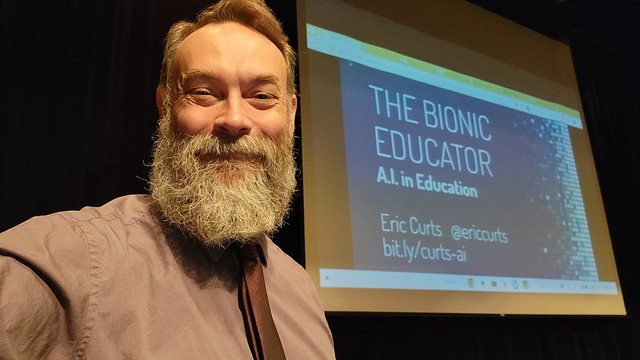
Eric Curts: The AI Guru Every Educator Should Follow
If you’re looking for ongoing AI updates, follow Eric Curts (@ericcurts) on every platform you use. He’s constantly testing new AI tools, sharing strategies, and making tech accessible for teachers. His website, ControlAltAchieve.com, is a goldmine of resources.
Using AI Responsibly: Our Obligation as Educators
With great power comes great responsibility. AI can be a massive benefit, but only if we use it ethically and responsibly:
- AI should never replace teachers—it should support and enhance what we do.
- Transparency is key—Students should know when and how AI is being used in their learning.
- We must verify content accuracy—AI can generate misinformation, so always double-check AI-generated materials.
- We control the ethical use—It’s up to us to model responsible AI integration, ensuring student privacy, academic integrity, and equity in classrooms.
AI isn’t something to fear. It’s something to learn to use wisely.
Final Thoughts: Don’t Get Left Behind
We’re at the start of something massive. AI isn’t coming—it’s already here and transforming education faster than we realize. You don’t have to dive in all at once but start experimenting with one or two tools. Once you see how much time AI can save you, you’ll never look back.
To keep up with the latest AI tools, check out my resource hub, which I’ll update frequently with new and useful tech: https://bit.ly/hagedorn-ai
Now, go try one of these AI tools today—your future self will thank you.
**********AI Tool Access: Free vs. Paid Versions
All the AI tools listed here offer free tiers with valuable features, but they also have paid versions that unlock extra capabilities. Here’s a quick breakdown of what I’ve learned:
- ChatGPT – I personally pay for ChatGPT because it gives me faster responses, better reasoning, and the ability to process larger files without breaks. Free users can access ChatGPT-3.5, while paid users ($20/month) get ChatGPT-4 with superior features.
- Gamma.app – I also pay for Gamma.app because I use it frequently. The free version limits you to 8 slides per presentation, but you can create multiple decks and combine them after exporting them as Google Slides or PowerPoint. Paid users get unlimited slides and premium templates.
- Brisk – I use Brisk’s free version, which is fantastic! Free users can generate activities, assessments, and feedback, but paid users gain expanded automation tools, grading support, and deeper student analytics.
- Magic School – I’ve never paid for Magic School, yet I’ve gotten so much use out of it! The free tier includes a huge range of AI teaching tools, while the paid version offers deeper lesson customization and AI-powered student feedback.
- School AI (Sidekick) – I haven’t paid for this one either, and I’ve still found it incredibly useful. The free version allows students to use AI assistants (75 students per day for free) and learning spaces, but the paid school-wide version includes expanded AI monitoring, LMS integrations, and admin controls.
- NotebookLM – This is currently free in beta, and I’ve used it extensively to record class discussions and create AI-generated study podcasts. Google may introduce premium features in the future, but right now, it’s a must-try at no cost.
Bottom Line: Every tool has a free version worth exploring. I personally choose to pay for ChatGPT and Gamma.app because they’ve been the most beneficial for my workflow. But that’s just me! You don’t need to spend money to see the benefits—just start with what’s available and expand as needed!
If you liked this post you’ll also appreciate:
From Chao to Clarity: How ChatGPT Helped Me Find My Missing Piece by Matt Hagedorn
Creating a Scavenger Hunt with Google Forms and QR Codes by Andy Milne
Teacher and Stress Reliever: From Sonic to Valorant by Joshua Peters
Have you checked out our latest Book of the Month recommendation?
 #slowchathealth
Until such time as AI is proven to have original thought, I’ll give it a miss, sadly, I remember the saying “rubbish in = rubbish out”.
OH how I wish for some original thoughts/ideas.
LikeLike
I hear you! I don’t think of AI as replacing original thought—it’s more like a sidekick that helps bring your ideas to life. When you use it with purpose, it can save time on the busywork and make more space for the creative, meaningful stuff. It’s not “rubbish in, rubbish out” if you’re putting good thinking in.
LikeLike